Automating Qualys AWS EC2 connector creation with Control Tower
When managing multiple AWS accounts in an organization, keeping security tools in sync with new accounts can be challenging. This project automates the creation of Qualys AWS EC2 connectors whenever a new account is provisioned through AWS Control Tower.
This was also an opportunity to combine things i enjoy working with: serverless architecture, AWS, Python, and automation.
The problem
At work, we used Qualys to inventory and scan EC2 resources across our AWS organization. Every time a new account was created via Control Tower, someone had to manually:
- Log into Qualys portal
- Create a new AWS EC2 connector
- Copy the external ID
- Create an IAM role in the new account with the correct trust policy
- Activate the connector
This was tedious, error-prone, and often delayed - sometimes new accounts would go days without proper security visibility.
Native alternatives
Before building this, i searched for native solutions:
Qualys Organization connector: Since 2022 (Qualys Connector v1.1), Qualys offers an Organization connector that can automatically discover accounts in an AWS Organization. This project was built around the same time (July 2022), when this feature was either just released or not yet mature enough for our needs.
Qualys CloudFormation templates: Qualys provides CloudFormation templates for connector creation, but these are designed to be run manually or as part of account provisioning - not triggered automatically by Control Tower events.
If you’re starting fresh today, evaluate the Organization connector first. This custom solution may still be useful if you need:
- Specific Control Tower lifecycle event triggers
- Custom filtering logic (e.g., only production accounts)
- Slack notifications
- Custom IAM role naming conventions
The solution
i built a Lambda function that:
- Listens for Control Tower
CreateManagedAccountlifecycle events - Creates a Qualys AWS EC2 connector via the Qualys API
- Sets up the IAM role in the new account using STS assume role
- Activates the connector
- Sends a Slack notification with the result
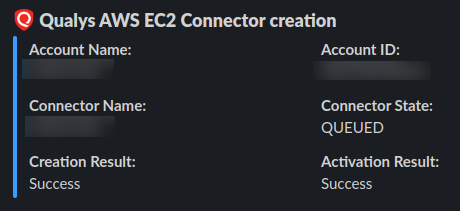
Architecture
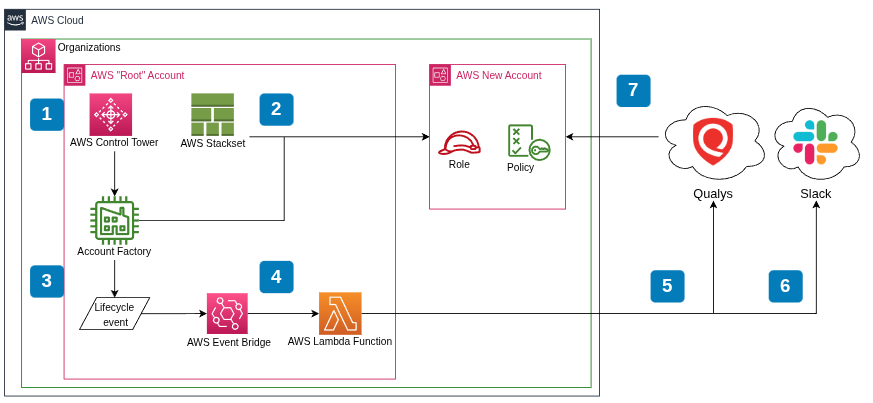
The Qualys API client
The core of the project is a Python client for the Qualys Asset Management API. Here’s how it creates a connector:
def create_aws_connector(self, connector_name):
    """
    Create an AWS EC2 Connector. By default, the connector will be in disabled state.
    To activate, call the activate_aws_connector method.

    Args:
        connector_name (str): The name of the connector to be created.

    Returns:
        (response, status) (tuple): Response object and boolean status.
    """
    headers = {
        'Content-type': 'text/xml',
    }

    api_endpoint = "qps/rest/2.0/create/am"
    object_category = "awsassetdataconnector"
    connector_creation_xml_data = AWSConnectorHandler.handle_connector_creation_xml(connector_name)
    response = self.__make_basic_post_request(endpoint=api_endpoint,
                                              object_category=object_category,
                                              headers=headers,
                                              data=connector_creation_xml_data)
    status = True if response.status_code == 200 else False
    return response, status
The API uses XML payloads. Here’s the template for creating a connector:
<?xml version="1.0" encoding="UTF-8" ?>
<ServiceRequest>
    <data>
        <AwsAssetDataConnector>
            <name>connector_name</name>
            <allRegions>true</allRegions>
            <externalId>1658443190235</externalId>
        </AwsAssetDataConnector>
    </data>
</ServiceRequest>
The connector_name placeholder gets replaced at runtime with the actual account name.
Cross-account IAM setup
The tricky part is setting up IAM in the newly created account. The Lambda in the management account needs to assume a role in the target account to create the Qualys role:
def setup_iam(qualys_base_account_id, external_id, account_id):

    boto_sts = boto3.client('sts')

    stsresponse = boto_sts.assume_role(
        RoleArn=f"arn:aws:iam::{account_id}:role/qualysintegrationassumerole",
        RoleSessionName='newsession'
    )

    newsession_id = stsresponse["Credentials"]["AccessKeyId"]
    newsession_key = stsresponse["Credentials"]["SecretAccessKey"]
    newsession_token = stsresponse["Credentials"]["SessionToken"]

    iam_client = boto3.client(
        'iam',
        aws_access_key_id=newsession_id,
        aws_secret_access_key=newsession_key,
        aws_session_token=newsession_token
    )

    role_name = "Role_For_QualysEC2Connector"

    trust_relationship_policy = {
        "Version": "2012-10-17",
        "Statement": [
            {
                "Sid": "",
                "Effect": "Allow",
                "Principal": {
                    "AWS": f"arn:aws:iam::{qualys_base_account_id}:root"
                },
                "Action": "sts:AssumeRole",
                "Condition": {
                    "StringEquals": {
                        "sts:ExternalId": external_id
                    }
                }
            }
        ]
    }

    role_res = iam_client.create_role(
        RoleName=role_name,
        AssumeRolePolicyDocument=json.dumps(trust_relationship_policy),
        Description="Role for Qualys EC2 Connector"
    )
    # ... attach policy ...
    return role_res['Role']['Arn']
The external ID in the trust policy is crucial - it’s generated by Qualys when the connector is created and prevents the confused deputy problem.
Lambda handler
The Lambda handler ties everything together:
def lambda_handler(event, context):
    if event['detail']['serviceEventDetails']['createManagedAccountStatus']['state'] == 'SUCCEEDED':

        account_name = event['detail']['serviceEventDetails']['createManagedAccountStatus']['account']['accountName']
        account_id = event['detail']['serviceEventDetails']['createManagedAccountStatus']['account']['accountId']

        if not check_account_production(account_name):
            return

        try:
            response, connector_creation_status = qualys_client.create_aws_connector(account_name)

            if connector_creation_status:
                connector_as_dict = AWSConnectorHandler.xml_to_dict(response.text)
                connector = AWSConnectorHandler.dict_to_object(connector_as_dict)[0]

                role_arn = setup_iam(
                    qualys_base_account_id=qualys_client.base_account_id,
                    external_id=connector.external_id,
                    account_id=account_id
                )

                response, connector_activation_status = qualys_client.activate_aws_connector(
                    connector_id=connector.id,
                    role_arn=role_arn
                )

                if connector_activation_status:
                    qualys_client.notifier.send_message(
                        on_success=True,
                        account_name=account_name,
                        account_id=account_id,
                        connector=connector,
                        creation_result=connector_creation_status,
                        activation_result=connector_activation_status
                    )
        except Exception as err:
            qualys_client.notifier.send_message(
                on_success=False,
                account_name=account_name,
                account_id=account_id,
                error_message=err
            )
The check_account_production function filters accounts - we only created connectors for production accounts (those ending with “prd”, “prod”, or “production”).
XML parsing
The Qualys API returns XML responses. The handler parses them into Python objects:
@staticmethod
def xml_to_dict(connectors_as_xml):
    all_connectors = []
    tree = ET.ElementTree(ET.fromstring(connectors_as_xml))
    root = tree.getroot()
    for connector in root.findall('.//AwsAssetDataConnector'):
        connector_as_dict = {
            "id": connector.find("id").text,
            "name": connector.find("name").text,
            "awsAccountId": connector.find("awsAccountId").text if connector.find("awsAccountId") else None,
            "connectorState": connector.find("connectorState").text,
            "externalId": connector.find("externalId").text,
            # ... more fields ...
        }
        all_connectors.append(connector_as_dict)
    return all_connectors
Slack notifications
When a connector is created (or fails), the team gets notified via Slack:
def send_message(self, **kwargs):
    request_headers = {
        "Content-Type": "application/json",
    }

    slack_message = self.assemble_message(kwargs)
    data = json.dumps(slack_message)
    requests.post(url=self.__webhook_url, headers=request_headers, data=data)
The notification includes account name, account ID, connector state, and creation/activation results.
API version note
This project uses the Qualys Asset Management API v2:
qps/rest/2.0/create/am/awsassetdataconnectorqps/rest/2.0/update/am/awsassetdataconnectorqps/rest/2.0/delete/am/awsassetdataconnector
Qualys has since released API v3 with additional features like runFrequency, activation modules, and Cloud Perimeter Scan. The v2 APIs may be deprecated in the future. See Connector APIs (3.0) for details.
What i learned
This project was a great opportunity to work with technologies i enjoy - serverless, AWS, Python, and automation - while solving a real operational problem.
Building this taught me:
- Qualys API - Working with their XML-based Asset Management API
- Cross-account IAM - Using STS AssumeRole to manage resources across accounts
- Control Tower events - Hooking into AWS Control Tower lifecycle events via EventBridge
- External ID pattern - Understanding why external IDs matter for cross-account trust
- Serverless automation - Using Lambda for event-driven infrastructure management